
Slate
Private Journal
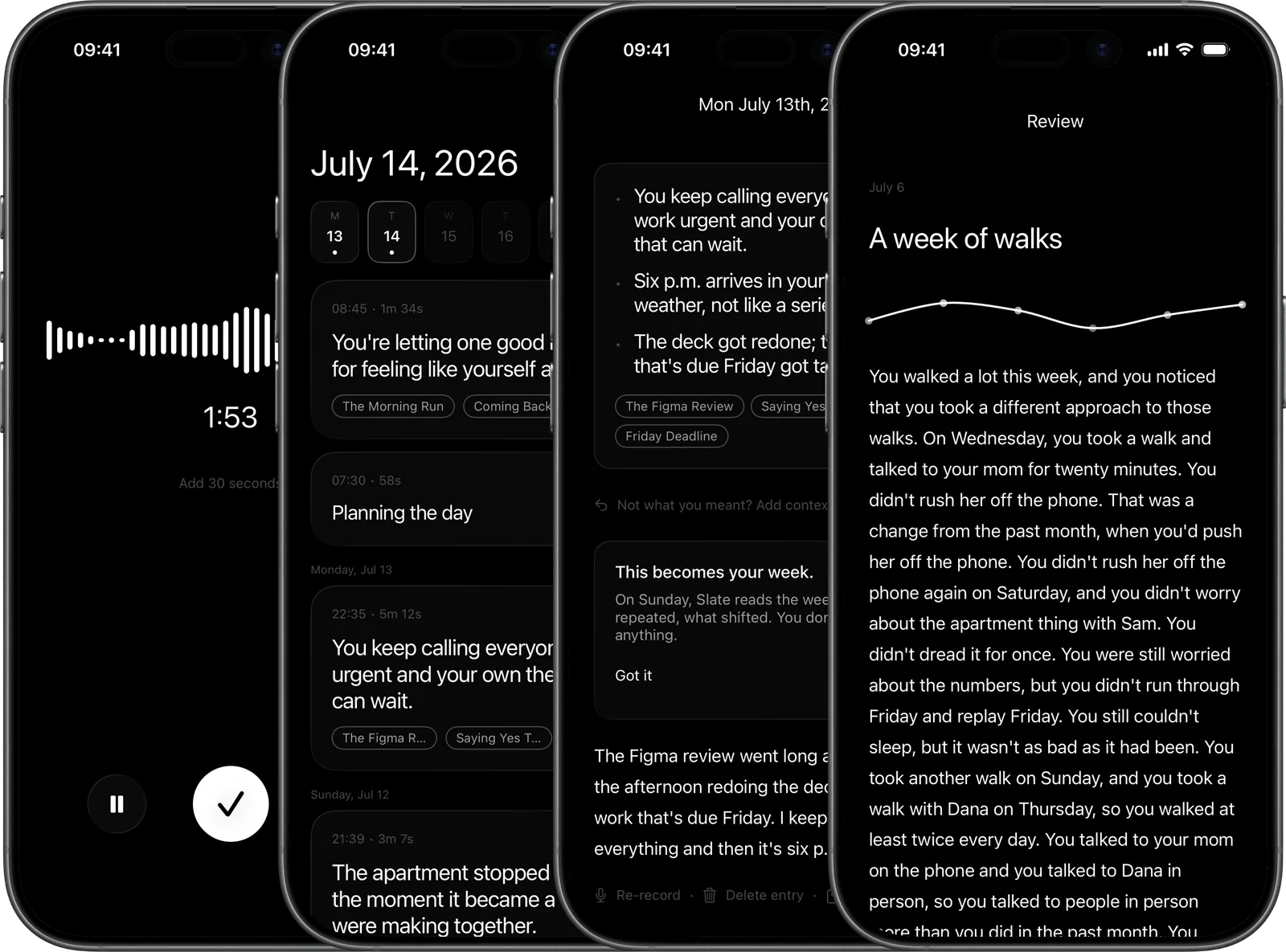
What Slate is
A private voice journal. You talk, your iPhone writes it down, and Slate notices what keeps coming up and reads your week back. No server, no account. Everything stays on the phone.
What people are saying
this is the way
@jack
App of the week.
@digiminimalist
Apple's on-device models are quite good at transcription. This Slate transcription app is another good example.
@twid
i love beautiful apps, i love functional apps, i love apps made entirely natively, i love privacy.
@WinterCawfie
This is cool. There is a future for local-first AI apps
@andrestaltz
Just subscribed.
@nonewthing
顧客視点に立脚した課題評価は正しい。しかし作り手の理想はもっと不可欠だ。
This is great. #localfirst
@davemorin
First app I've stopped to think about in a while.
@localghost
Beautiful work, well done
@jackbutcher
Slate is lovely. One of the first apps to really use Apple's model APIs well.
@DanielSinclair
On my run yesterday I was thinking about if anything like this exists. It does. And I'll be using it.
@builtbyeli
Apps that protect users privacy and/or go fully on-device are the future.
@Sean1h3z
مدعوم بالكامل بتقنيات Apple. بدون إنشاء حساب. بدون تخزين سحابي. بدون تتبع. وبدون الحاجة إلى اتصال بالإنترنت.
What makes Slate great
No server
Slate has no backend. Your words are processed by the phone, for the phone.
A card for every entry
Slate titles every entry and tells what happened in your own sentences. When a name or theme keeps coming up, it says so.
Word for word
Apple’s on-device speech engine writes down what you said, entirely on the phone.
The model lives here
Three billion parameters on the Neural Engine, writing reflections in airplane mode. It has never seen a server.
Start from anywhere
Lock screen, widget, Action button. Tap, talk, done. AirPods and wired mics supported.
A recording is never lost
Dead battery, killed app, a session at its limit. The recording is saved and finished on the next launch. You will not lose eleven minutes of thinking.
Sunday asks, you answer
Each weekly review ends with one open question. That evening, it heads the record screen the next two times you open it.
Not what you meant? Say so
Add context and Slate reflects again. Re-transcribe in another language, or re-record entirely.
Copy anything
Every transcript has a Copy button. Nothing leaves unless you paste it.
Yours to keep, yours to leave
Encrypted backup to your own iCloud. Export everything, anytime. Recordings never leave the phone.
Ten languages
English, Spanish, French, German, Italian, Portuguese, Japanese, Korean, Mandarin, and Cantonese, with regional variants of each. Pick per entry.
A reminder, not a nag
One quiet daily reminder at a time you choose. A local notification, because there are no push servers.
Recorded early? It catches up
Speak while Apple Intelligence is still downloading. The reflection arrives when the model does.
Free where it cannot reflect
Reflections need an iPhone 15 Pro or newer. Older iPhones record and transcribe free, forever.
Pay once if you prefer
A subscription with a free month, or lifetime. One payment, yours forever.
The Action button
One press on the side of your phone starts a session.
Total privacy
We cannot read your journal. Not won’t. Can’t. The App Store label says Data Not Collected because none is.
Your week, read back
Every Sunday, Slate reads the week back. What repeated, what shifted. You do nothing.
It quotes you or it stays quiet
Every observation must be backed by your own words. Anything invented gets dropped. A quiet day stays quiet.
Works in airplane mode
Recording, transcription, and reflection all run on the phone. The whole product works with the radio off.
The recording follows you
The session lives on the Lock Screen and in the Dynamic Island. Pocket the phone, the timer stays.
It tells you when it cannot hear you
Silence at the start of a session gets named, and the iPhone mic offered, instead of recording nothing. A plugged-in mic is used automatically.
Entries that belong together
Under each entry, up to three older ones that sound like it, found by sentence math on the phone.
Fix the transcript
Long-press to edit. Names, jargon, the one word it misheard.
Export, every which way
The whole journal as Markdown, JSON, or a zip with the m4a audio files. Any single entry from its own page. Real files, in your Files app.
Reinstalls heal themselves
New phone, a month away, whatever happened. With backup on, your journal comes back on its own.
Sessions your size
Half a minute, two or five minutes, or no limit. Add thirty seconds when the thought needs it. A limit saves the entry, never cuts it.
Notifications that know nothing
Your entry is ready. That is the entire notification. Nothing a lock screen could leak.
Reads the way you need it
Dynamic Type everywhere, VoiceOver labels written by hand, and Reduce Motion stills every animation.
Cancel and keep everything
Every reflection already written stays yours. Nothing is clawed back.
Type it, when speaking is not the moment
A meeting, a train, midnight. A typed entry gets the same reflection a spoken one does.
Apple Watch
Record from your wrist. The entry is on the phone when you get back to it.
Why Slate
A journal only works if you tell it the truth. You will tell it the truth when you are certain nobody else can read it. A privacy policy asks you to trust a company. A missing server settles the question.
Slate transcribes your voice on the phone, writes the reflection on the phone, and keeps every word there. There is no second copy anywhere.
The recording is raw material. What matters is what you notice, the thing you keep circling, the week that reads differently once it is read back to you. Slate never advises. It quotes.
Slate vs the typical journal app
Questions
Can anyone at Slate read my journal?
No. Not won’t, can’t. Your words never reach us. There is nothing for us to view, listen to, or read, because there is no server.
Does it really work offline?
Yes, all of it. Recording, transcription, reflections, the weekly review. Turn on airplane mode and record an entry. Everything still works.
How do reflections work?
Since 0.0.32, every entry gets a card. Apple's on-device model writes the title and tags, and each one is checked against what you said. Anything that is not there gets dropped. What happened stays in your own sentences. When an entry echoes one from the past week, the reflection can show what you said then.
Can I type instead of talk?
Yes, since 0.0.12. The record screen has a typing option, and a typed entry gets the same reflection a spoken one does.
What happens if I stop paying?
Every reflection already written stays yours. Nothing is clawed back. Only new entries wait for the subscription.
What does backup actually back up?
Transcripts and reflections, encrypted, to your own iCloud, and only if you turn it on. It is off by default. Recordings never leave the phone.
Technical specifications & requirements
iPhone
Slate is built for iPhone, running iOS 26 or later. It installs on iPad in compatibility mode, and an Apple Watch app is coming.
Recording and transcription
Works on any iPhone that runs iOS 26. Transcription uses Apple's on-device speech engine. Nothing about it requires the newest hardware, a connection, or an account.
Reflections and the weekly review
Written by Apple Intelligence, which needs an iPhone 15 Pro or newer with Apple Intelligence turned on in Settings. On older iPhones, recording and transcription are simply free and reflections never appear.
The model
iOS downloads Apple's on-device model once, about 7 GB, usually over Wi-Fi. Slate waits for it: entries recorded before the download finishes reflect themselves when it lands.
Languages
Transcription in English, Spanish, French, German, Italian, Portuguese, Japanese, Korean, Mandarin, and Cantonese, with regional variants of each. Language packs are downloaded and managed by iOS.
Surfaces
The Action button needs an iPhone 15 Pro or newer. The Dynamic Island needs an iPhone 14 Pro or newer. The Lock Screen recording timer and widgets work on every supported iPhone.
Permissions
The microphone, only while recording or choosing a mic. Notifications are optional and asked for only if you choose a reminder. Face ID, only if you turn on the lock. That is the whole list.
Backup
Optional and off by default. Turning it on needs an iCloud account. Transcripts and reflections back up to your own iCloud, encrypted. Recordings never leave the phone.